 SEASON
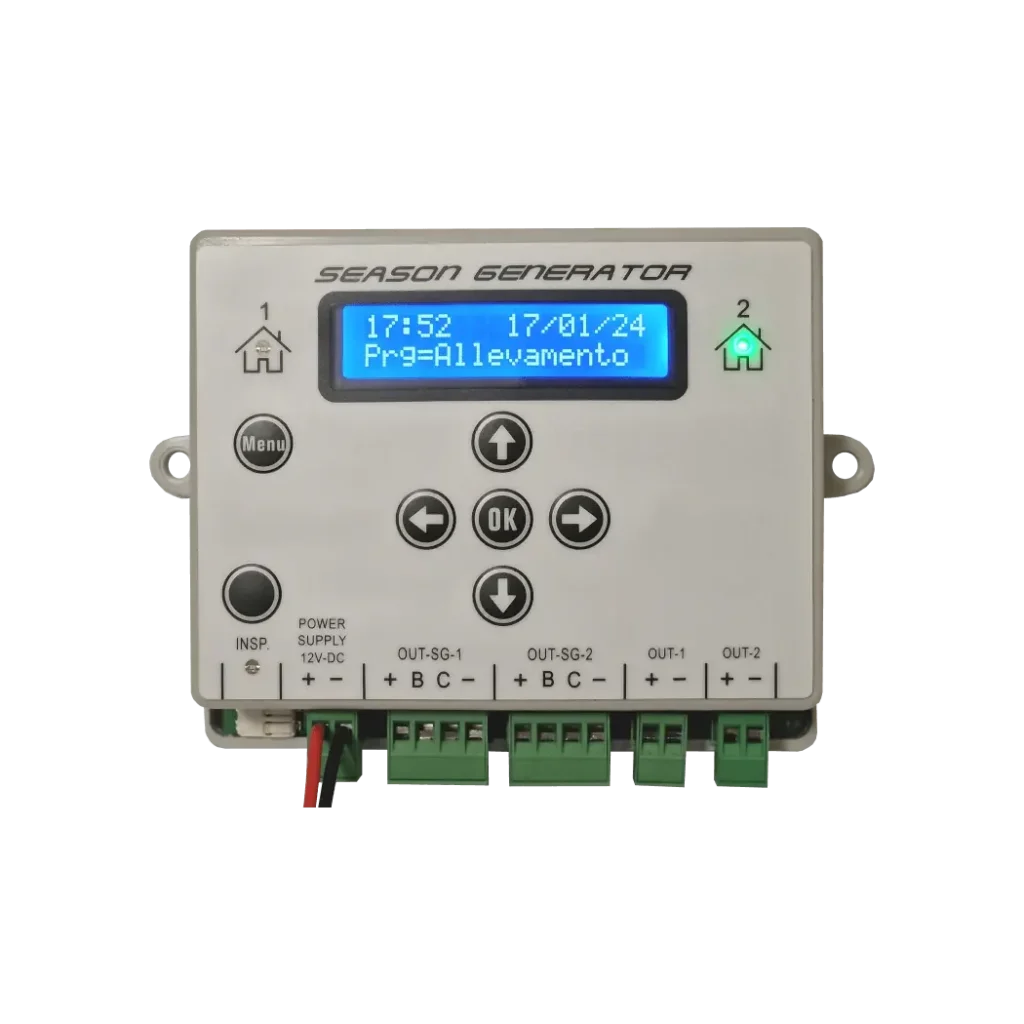
Four-wire PRO bars or two-wire Standard bars: choose the output that suits your system.
Lighting controller · LED bars
SOL-LED Dawn and dusk lighting controller for bird rooms and canaries
Photoperiod on your LED bars. Gradual dawn and dusk, seasonal programs and two rooms that can follow different cycles.
199,00 €VAT included
Illustrative images. Some images are digitally processed and may differ from the actual product. Check features and contents in the product details. Read the full notice
- PRO bars with 4 wires and Standard with 2 wires, on dedicated outputs.
- Two independent rooms or two synchronised groups.
- External power supply, chosen according to the voltage and load of the bars.
12–24 Vstabilised DC supply
2rooms with separate programs
2,5 Amaximum load per output
1–100minutes for dawn and dusk
Photoperiod for LED bars
The season changes. The light follows it.
Dawn, day, dusk. Each room with its own program.
A dawn and dusk controller for birds and canaries. SOL-LED switches the LED bars in your bird room on and off gradually, like the sun, and follows the photoperiod of the season. It is made for aviculture: canaries, exotic finches and decoy birds such as song thrush, redwing and fieldfare, with ready-made tables.
The SOL-LED dims low-voltage bars and updates the times according to the chosen program. You can use a seasonal table, define a personal progression or simulate the sun's cycle at a given place.
Dawn and dusk have separate durations. Maximum brightness adapts to your system, and you can run two rooms with independent settings.
Explore the programsPower and connectionsTwo wires or four?
Two wires or four?
Each bar has its own output.
First choose the bar type and its voltage. Then match the power supply, output and wiring.
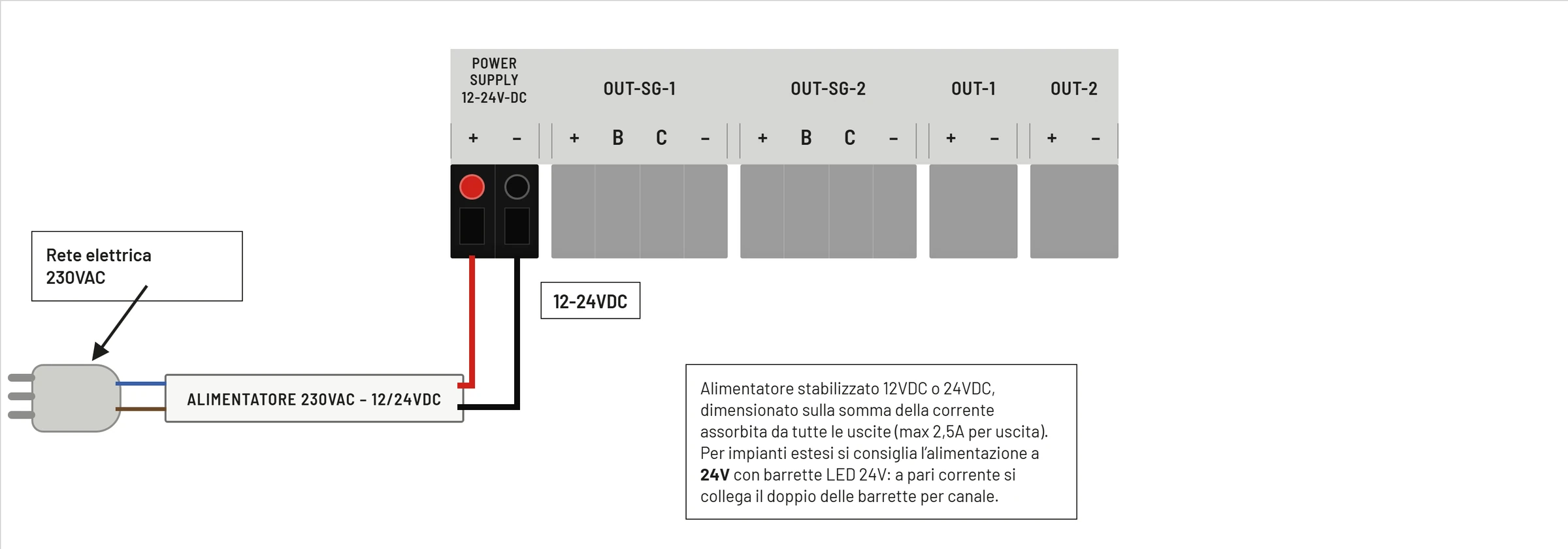
Network 230 V ACExternal power supply 12 or 24 V DCSOL-LED and compatible bars
The SOL-LED takes 12–24 V DC stabilised: the 230 V mains connects only to the external power supply. Choose the voltage required by the bars and observe the + / − polarity.
PRO · 4 wires
White and blue separate
Season Generator PRO bars on OUT-SG-1 or OUT-SG-2: power, main light control and a dedicated blue channel.
See connections and colours →Standard · 2 wiresPositive and negative
Standard bars or compatible two-wire strips on OUT-1 or OUT-2, with dimming handled upstream by the controller.
See the two-wire connection →Season Generator PRO bars
Four wires, four functions.
OUT-SG-1 follows room 1. OUT-SG-2 follows room 2. Always respect the terminal labels and the connector order.
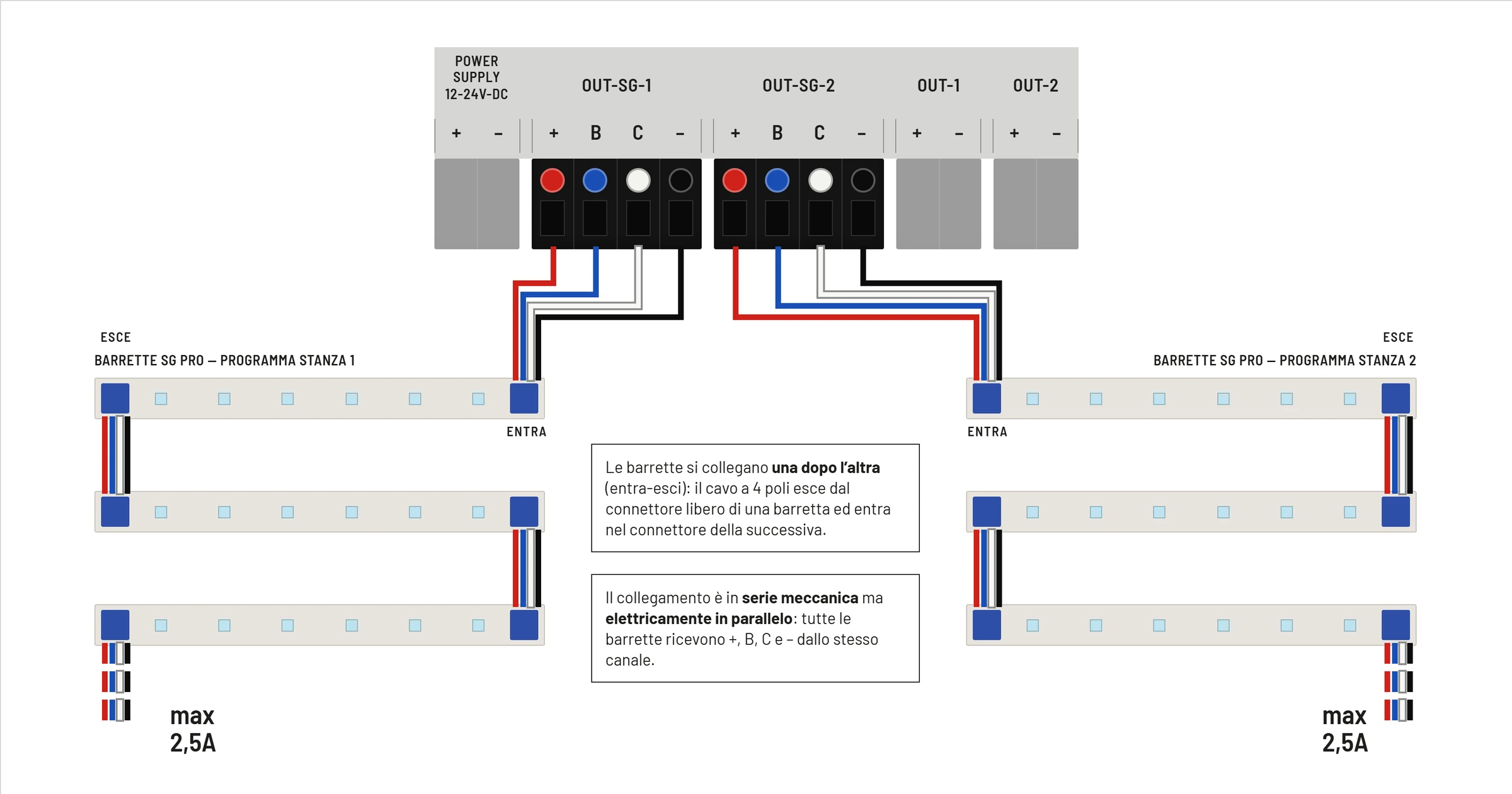
| Terminal | Wire | Function |
|---|---|---|
| + | Red | Supply positive |
| B | Blu | Blue LED channel / night light |
| C | White | PWM control of the main light |
| − | Black | Common negative / GND |
Limits given in the manual: power 2.5 A per output; channel B 100 mA; reference C 32 mA. Terminal C is a control, not a power output.
Open the PRO connection in the manual →Standard bars and two-wire LEDs
The light is regulated on the two conductors.
OUT-1 follows room 1. OUT-2 follows room 2. Use bars or strips compatible with the system's voltage and dimming.
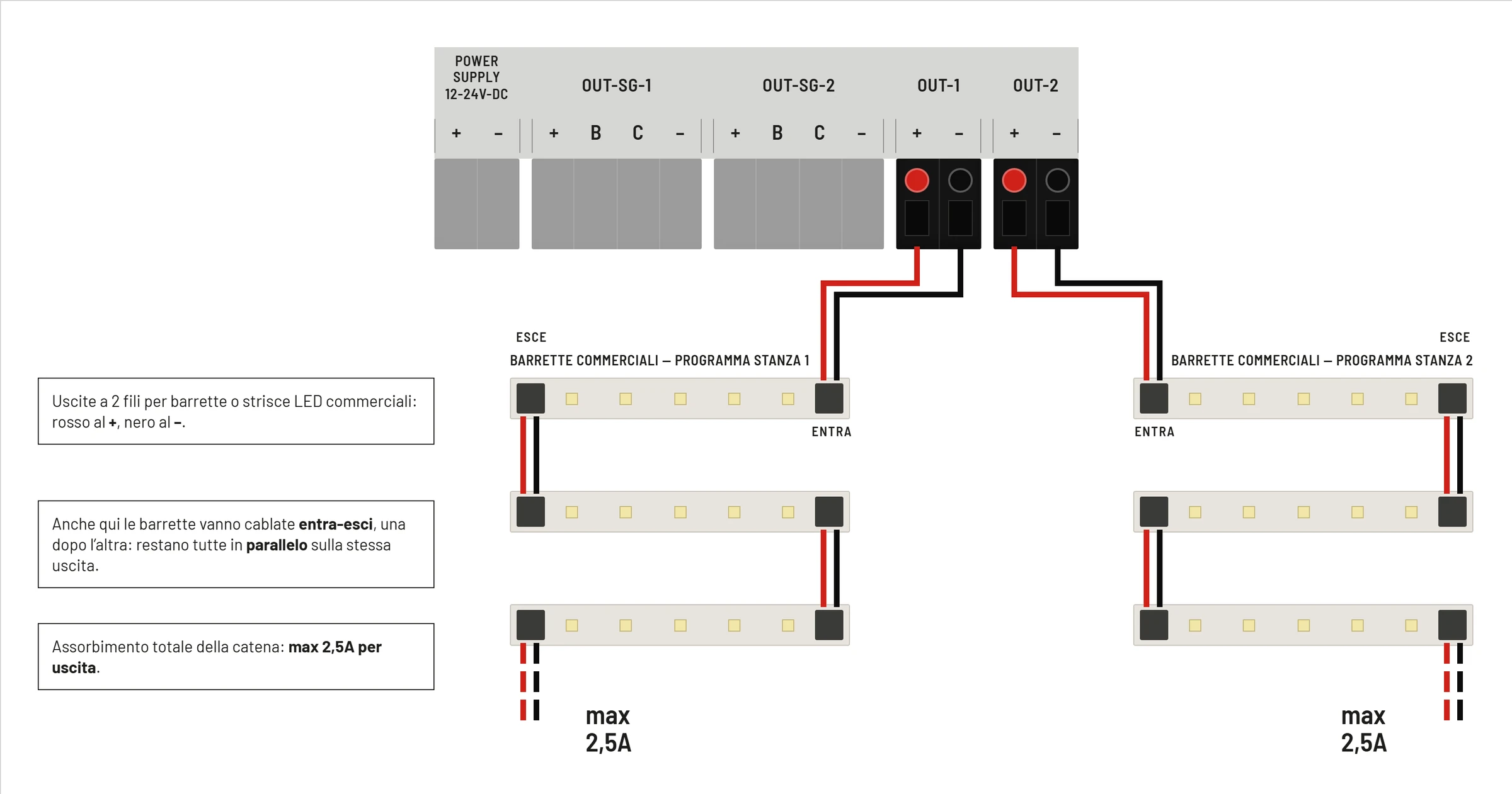
+ · red
Positive
Power to the bar, at the correct rated voltage.
− · black
Negative
Circuit return. The controller regulates the light on the two-wire output.
Standard bars have no separate conductor for the blue light. Don't swap OUT and OUT-SG, and don't connect the same bar to two outputs.
Open the Standard connection in the manual →Diagrams taken from the official SOL-LED manual. Make the connections with the power disconnected; check the voltage, current draw and connector limits of each bar.
One controller, two rooms
Together or independent.
In the Room use menu, choose how the two groups work. The right arrow selects the room to display and configure.
2-room mode
Two different cycles
Program, ramps, intensity, night light and energy saving can be set separately for each room.
1-room mode
Two synchronised groups
Room 2 follows room 1: two LED groups light the same room with the same dawn and dusk cycle.
The current limit stays that of each output: synchronised mode does not let you add them together electrically.
More on Room use →
Light programs
The programs you know, now on LED bars too.
Seasonal tables, Personal program 1, Personal program 2 and AstroGPS Timer: choose the light cycle for each room. With Manual you can keep the same times every day.
Already loadedPreset tables
Choose the species, the cycle is already written
The annual tables are selected from the menu. The controller applies the seasonal profile and updates the times according to the date set. The tables available depend on the version supplied.
See the tables on the website. The menu also includes Manual, for fixed times, and, on versions that have it, the Breeding table.
SOL-LED · Room use
Room 1Your cycle
Room 2Its own cycle
Select the room with the right arrow. In 2-room mode you can choose different programs and settings.
Personal program 1Daily increments
You set the change, it applies it every day
In the Personale program you set the starting dawn and dusk, a separate daily change for each of the two times, and the duration in days. At the end, the controller keeps the last times reached.
- Start — choose the starting dawn and dusk times.
- Change — set the daily minutes for dawn and dusk separately.
- Duration — choose for how many days to apply the changes.
- Confirm — save the program and the fade durations.
Demonstration video on the SOL-7000: it shows the logic of Personal program 1, which the SOL-LED shares. For buttons and screens, follow the SOL-LED instructions below.
Read the program instructions →Personal program 2Automatic interpolation
Two end points, it works out the rest
With Personale2 you set the starting dawn and dusk, the end date and the times to reach. The start date is the controller's current date: check the time and date before confirming.
The controller automatically spreads the intermediate times day by day, up to the date you chose.
- Start — current date and starting dawn and dusk times.
- End — end date and times to reach.
- Automatic calculation — intermediate times spread day by day.
- Fades — set the duration of dawn and dusk.
Demonstration video on the SOL-7000: it shows the logic of Personal program 2, which the SOL-LED shares. For buttons and screens, follow the SOL-LED instructions below.
Read the program instructions →AstroGPS TimerReal dawn and dusk
It knows where it is and what day it is
Set the controller's location, the time zone and the place whose photoperiod you want to simulate. AstroGPS Timer works out the seasonal progression and lets you enable twilight.
- Coordinates of the controller location.
- Set time, date and UTC offset correctly.
- Coordinates of the simulated location.
- Twilight can be enabled from the menu.
AstroGPS Timer42.50 · 12.50
Dawn06:20
Dusk19:45
Daylight hours13:25
Time zoneUTC +01:00
Illustrative display example, not a calculation for today's date. The real result depends on the date, coordinates and settings.
If you need a cycle entirely your own, different from these, you can draw it and send it to us: here's the page to do it.
Dawn and dusk
The light doesn't snap on: it rises.
The dawn and dusk fades can be set from 1 to 100 minutes. The curve shows a gentle rise and fall, with rounded transitions into daylight and night.
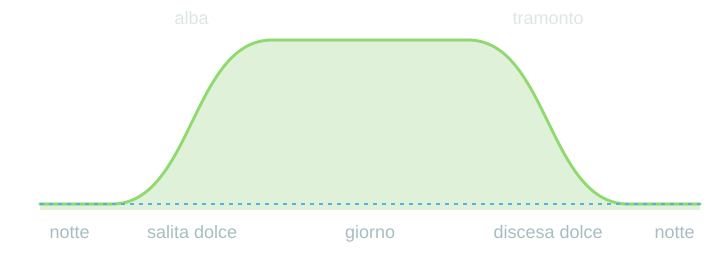
Fade duration
20minutes
Illustrative diagram, not to time scale: dawn and dusk are widened to show how gradual they are. The dashed blue line shows the night light. Example with a 20-minute fade; the actual durations are set on the controller.
Night and light management
The right brightness in every phase.
Night light
A point of reference in the night
Set a reduced level or OFF. On PRO bars the blue channel is separate from the main light; choose the level by looking at the actual result in the room.
Night light →Inspection
Go in, check, resume the cycle
The INSP. button calls up temporary light for inspection. The ramp-in and ramp-out are adjusted separately.
Night inspection →Timed saving
A pause when natural light is enough
You can set a switch-off window and choose a gradual return to the program's light. On the SOL-LED, saving is managed by time.
Energy saving →Complete your system
From the bars to the wall of cages.
Choose bars, cable lengths and fixings. In the configurator you can draw the layout of your system and prepare your request.
01 · Light
LED bars
Compare Standard and PRO, voltages, sizes and power ratings.
Choose the bar →02 · InstallationHooks and profiles
Consider cage fixing, guards and screens.
See the options →03 · DesignDraw your system
Lay out rows and columns of cages and choose the components.
Open the configurator →The design is indicative and will be reviewed before confirmation. Power supply, bars and accessories must be chosen according to the system.
Technical data
The SOL-LED in numbers.
| Power supply | 12–24 V DC stabilised, from an external power supply |
|---|---|
| Rooms | 2 independent, or 1 with synchronised groups |
| 4-wire PRO bars | OUT-SG-1 / OUT-SG-2 · terminals +, B, C, − |
| 2-wire bars | OUT-1 / OUT-2 · terminals + and − |
| Load current | 2.5 A maximum per output |
| Dawn and dusk ramps | 1–100 minutes, adjustable separately |
| Maximum brightness | 10–100% · fixed or seasonal intensity |
| Night light | OFF or a level up to 50% |
| Programs | Seasonal tables, Personal 1, Personal 2, AstroGPS Timer and Manual |
| Energy saving | Settable time window |
| Interface | LCD display, MENU, OK, arrow and INSP. buttons. |
| Memory | Settings in EEPROM; clock shared by the two rooms |
The controller for your system
SOL-LED, SOL-LED Plus or SOL-7000?
12–24 V · this page
SOL-LED
LED bars, two rooms, gradual dawn and dusk. Dedicated connections for two and four wires.
199,00 €Choose the quantity12–24 V · extra functions
SOL-LED Plus
The option to consider when you also need relay control and light sensor connection.
Discover the SOL-LED Plus230 V lamps
SOL-7000
For dimmable mains lamps and ON/OFF loads. See the connections and the tested E27 LED lamps.
Discover the SOL-7000Birds and canaries
Dawn and dusk controller: what breeders ask.
What is a dawn and dusk controller for birds?
It is a timer that switches the lights in your bird room on and off little by little, as at dawn and dusk, instead of an abrupt change from light to dark. It also adjusts the hours of light to the season.
Is it suitable for breeding canaries?
Yes. With the Canaries table, SOL-LED applies the scheduled hours of light every day, and it can run two rooms on different cycles.
How many hours of light do canaries need?
They change through the year: the day-by-day values are in the photoperiod table.
Does it also work with neon tubes?
SOL-LED drives 12–24 V LED bars, not neon tubes. To switch neon tubes on as well, through relays, there is SOL-LED Plus; for neon tubes and 230 V lamps with gradual dawn and dusk there is SOL-7000.
Frequently asked questions
Before connecting the bars.
What's the difference between two and four wires?
Standard bars take positive and negative on outputs OUT-1/OUT-2. PRO bars use OUT-SG-1/OUT-SG-2: besides positive and negative, they have the C control for the main light and the B channel for the blue LED.
Can I connect the SOL-LED directly to a 230 V socket?
No. You need a stabilised external power supply: the SOL-LED takes 12 or 24 V DC. The voltage must match that of the bars.
How many bars can I connect?
It depends on the model, the voltage and the current draw. Add up the consumption of the chain and respect 2.5 A per output, the limits of the PRO signals and those of the bar connectors. Also size the power supply and cables for the complete system.
Are daisy-chained bars connected in series?
They are laid out one after another, but electrically they stay in parallel. Keep the same wire-to-wire correspondence and never join the controller's outputs together.
Are the Personal 1 and Personal 2 programs here too?
Yes. The SOL-LED manual covers Personale, Personale2, AstroGPS Timer, Manuale and the seasonal tables. The linked videos show the shared logic; to set up the device, follow the SOL-LED instructions linked to each program.
Can I have two different schedules in the two rooms?
Yes, with Room use set to 2 rooms. In 1-room mode, on the other hand, the second follows the first.
What if I need relays or light sensors?
Look at the SOL-LED Plus page and consider the right accessories. The energy saving described for the SOL-LED works with a set time window.
Manual and support
From wiring to the first program.
Official diagrams, instructions for every function and direct support to choose the components.